2026-05-10 · tech
Build Your Own Cloud
Imagine one day, you wake up and your Google account is locked because Google thinks you’re Hamas because you don’t agree with genocide. And appealing to them is fruitless. All your email, photos, files, gone. It’s totally possible. It’s not just about the never-ending monthly money sacrifice, when your data lives on someone else’s server, it’s not really yours. You’re renting space in someone else’s house, playing by their rules. But if your data lives in your hardware, under your own roof, you’re in control. That’s data sovereignty.
This was a journey I started. It didn’t require fancy server hardware. I just dusted off my little brother’s old 2012 Mac Mini and upgraded the RAM and swapped in an SSD. It’s not a powerhouse, but for a handful of services I needed to run, it was enough. For storage, I hooked up two external hard drives configured in RAID 1. If one drive fails, my data is still intact on the other, and I can replace the failed drive. I installed Ubuntu on it and ran everything in Docker. The beauty of running everything in Docker is that it’s easily reproducible. If my hardware dies tomorrow, I can spin everything back up on a new hardware with one command.
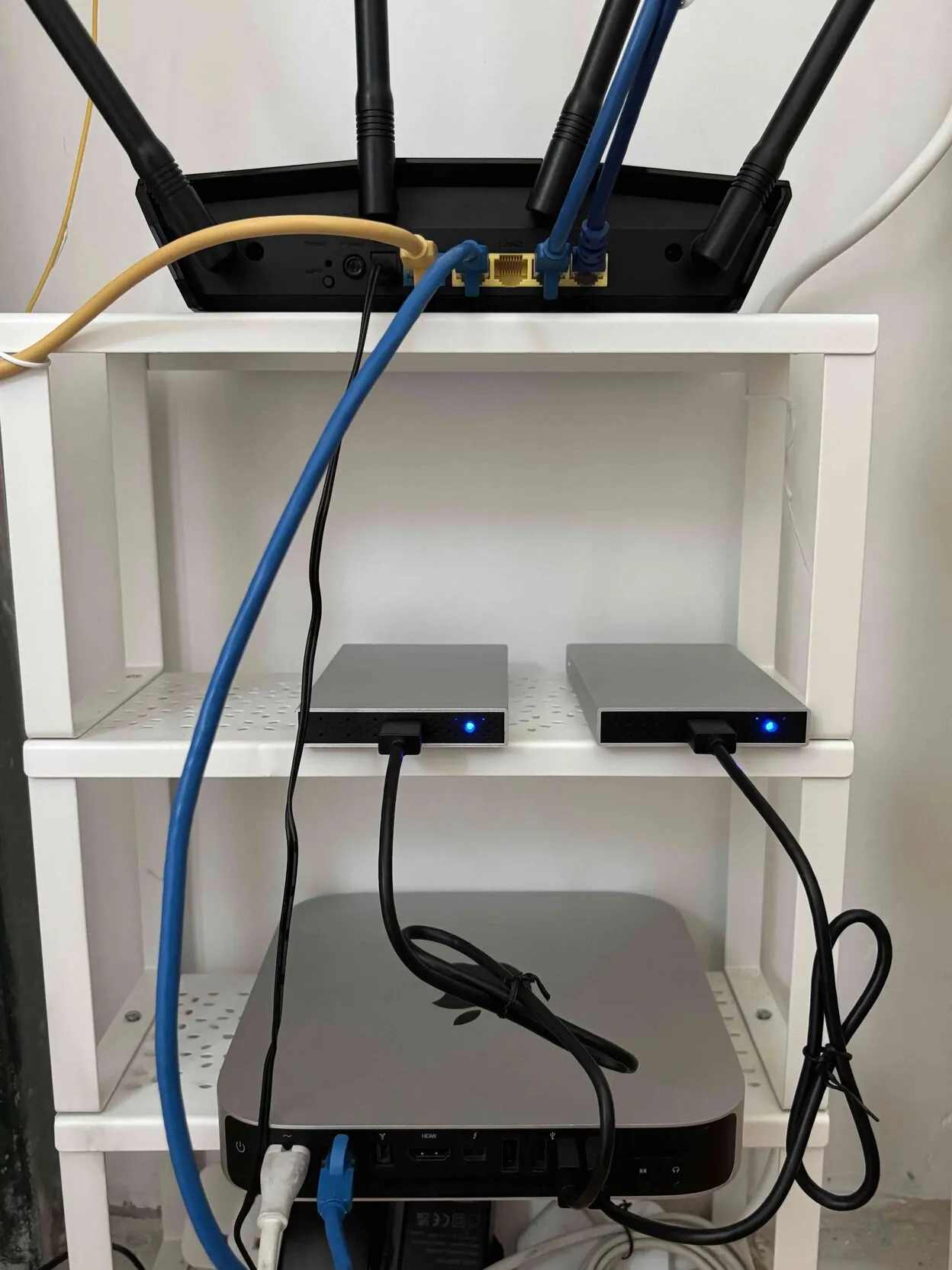
These are everything I’m running on it.
- Vaultwarden A self-hosted password manager. It’s compatible with Bitwarden so you can use the Bitwarden app as a client.
- Immich A Google Photos replacement. The UI is beautiful and the facial-recognition is surprisingly capable given the hardware I’m using.
- OpenCloud A self-hosted cloud storage. My Google Drive replacement.
- Home Assistant A local, no-cloud smart home hub for all my smart devices. With this, I’m also no longer restricted to Homekit compatible devices only.
- FreshRSS A lightweight RSS reader to aggregate my own news, getting tired of algorithms feeding me news (and ads in between).
- WireGuard VPN to securely access my home server from anywhere. I used wg-easy which gives a simple web UI to manage clients.
- AdGuard Home A network-wide ad blocker and DNS rewrites.
- Nginx Proxy Manager Reverse proxy with a nice UI. Handles routing traffic to the right services.
Here’s how the networking works. I connect my device to the VPN. Inside WireGuard, I’ve set AdGuard Home as the DNS server. So all my traffic gets routed there. Aside from blocking ads, AdGuard Home supports DNS rewrites so I can enter something like photos.asyraf.cloud — even if I don't own it — and AdGuard Home can still point it to an address in the network, which I point it all to the Nginx Proxy Manager. From there, based on the hostname of the request, it routes traffic appropriately to the desired service.
On iOS, there are issues when using weird TLDs like .asyrafnet, so try to use a generic TLD if you can
That’s only half of the puzzle. To get it to work from outside my home network, I need to expose port 51820 for my WireGuard VPN. Like a lot of ISPs today, my ISP does not provide a public static IPv4 address. But, fortunately, I was allowed to open ports on the router’s firewall. No IPv4 address but can open ports? What’s the point? Well how about IPv6 address? Each devices in my home network was given a dynamic public IPv6 address, I can make use of that.
I then found out that my ISP-provided router does not have a settings page for IPv6 port forwarding — only IPV4 — which was pretty dumb given that they don't give out public IPv4 address, static or otherwise. So I bought another router, an Asus AX1800, connect them together and put the previous router in bridge mode. The new router has a IPv6 port forwarding page, I made sure of that before purchase. Regarding the dynamic IPv6 address, the firewall rule on the router accepts using the second half of the IPV6 address (interface ID), so I don’t need to constantly update the firewall rule because the first half of the IPv6 is dynamic. But to connect to WireGuard, I will need to use the IPv6 which can get annoying because it regularly changes so I used a DDNS service to map a fixed domain to my IPv6 address.
If you don't want to deal with all these networking stuff, you can use Tailscale or Cloudflare Tunnel, but hey, that's another third-party service you're at the mercy of.
So there’s my homelab setup. There’s some learning curve to it, but once it’s set up, it just works. Now my photos are mine, my passwords are mine. No company can flip a switch and take it away from me. If you’ve got an old computer lying around, give it a try.
services:
  wireguard:
    image: ghcr.io/wg-easy/wg-easy:15
    container_name: wireguard
    restart: unless-stopped
    ports:
      - "51820:51820/udp"
      - "51821:51821/tcp"
    volumes:
      - /mnt/data/wireguard:/etc/wireguard
      - /lib/modules:/lib/modules:ro
    environment:
      - INSECURE=true
    cap_add:
      - NET_ADMIN
      - SYS_MODULE
    sysctls:
      - net.ipv4.ip_forward=1
      - net.ipv4.conf.all.src_valid_mark=1
      - net.ipv6.conf.all.disable_ipv6=0
      - net.ipv6.conf.all.forwarding=1
      - net.ipv6.conf.default.forwarding=1
    networks:
      home_net:
        ipv4_address: 10.42.42.21
        ipv6_address: fdcc:ad94:bacf:61a3::2a

  adguardhome:
    image: adguard/adguardhome
    container_name: adguardhome
    restart: unless-stopped
    ports:
      - "80:80/tcp"
    volumes:
      - /mnt/data/adguard/work:/opt/adguardhome/work
      - /mnt/data/adguard/conf:/opt/adguardhome/conf
    networks:
      home_net:
        ipv4_address: 10.42.42.53

  nginx-proxy-manager:
    image: 'jc21/nginx-proxy-manager:latest'
    container_name: nginx-proxy-manager
    restart: unless-stopped
    environment:
      TZ: "America/Toronto"
    ports:
      - '81:81'
      - '443:443'
    volumes:
      - /mnt/data/npm/data:/data
      - /mnt/data/npm/letsencrypt:/etc/letsencrypt
    networks:
      home_net:
        ipv4_address: 10.42.42.10

  vaultwarden:
    image: vaultwarden/server:latest
    restart: unless-stopped
    container_name: vaultwarden
    networks:
      - home_net
    volumes:
      - /mnt/data/vaultwarden/data/:/data/

  opencloud:
    image: opencloudeu/opencloud-rolling:5
    restart: unless-stopped
    container_name: opencloud
    entrypoint:
      - /bin/sh
    command: ["-c", "opencloud init || true; opencloud server"]
    environment:
      OC_INSECURE: "true"
      OC_URL: "https://drive.example.com"
      PROXY_TLS: false
    volumes:
      - /mnt/data/opencloud/data/:/var/lib/opencloud
      - /mnt/data/opencloud/config/:/etc/opencloud
    networks:
      - home_net

  immich:
    container_name: immich
    image: ghcr.io/immich-app/immich-server:v2
    volumes:
      - /mnt/data/immich:/data
      - /etc/localtime:/etc/localtime:ro
    depends_on:
      - immich-redis
      - immich-postgres
    restart: unless-stopped
    networks:
      - home_net

  immich-ml:
    container_name: immich-ml
    image: ghcr.io/immich-app/immich-machine-learning:v2
    volumes:
      - ~/.local/share/immich/cache:/cache
    restart: unless-stopped
    networks:
      - home_net

  immich-redis:
    container_name: immich-redis
    image: docker.io/valkey/valkey:9
    restart: unless-stopped
    networks:
      - home_net

  immich-postgres:
    container_name: immich-postgres
    image: ghcr.io/immich-app/postgres:14-vectorchord0.4.3-pgvectors0.2.0
    environment:
      POSTGRES_PASSWORD: <your-password>
      POSTGRES_USER: <your-user>
      POSTGRES_DB: immich
      POSTGRES_INITDB_ARGS: '--data-checksums'
    volumes:
      - ~/.local/share/db:/var/lib/postgresql/data
    shm_size: 128mb
    restart: unless-stopped
    networks:
      - home_net

  homeassistant:
    container_name: homeassistant
    image: "ghcr.io/home-assistant/home-assistant:stable"
    volumes:
      - /mnt/data/homeassistant/config:/config
      - /etc/localtime:/etc/localtime:ro
      - /run/dbus:/run/dbus:ro
    restart: unless-stopped
    privileged: true
    network_mode: host

  freshrss:
    container_name: freshrss
    image: freshrss/freshrss
    restart: unless-stopped
    networks:
      - home_net
    volumes:
      - /mnt/data/freshrss/data:/var/www/FreshRSS/data
      - /mnt/data/freshrss/extensions:/var/www/FreshRSS/extensions
    environment:
      TZ: 'America/Toronto'
      CRON_MIN: '1,31'

networks:
  home_net:
    driver: bridge
    enable_ipv6: true
    ipam:
      driver: default
      config:
        - subnet: 10.42.42.0/24
        - subnet: fdcc:ad94:bacf:61a3::/64